Webinar Lead Generation: How to Turn Registrations Into Pipeline Signal
Learn how webinar lead generation turns registrations, engagement, follow-up, and replay behavior into stronger B2B pipeline signal.
Key Takeaways
Webinar lead generation works when the event is built around the right audience instead of chasing the largest possible registration list.
Strong promotion uses several distribution loops before the live date. Owned email, website placement, sales outreach, and employee advocacy help activate audiences the company can already reach. Guest promotion, ABM lists, paid campaigns, and reusable social assets extend that reach into more specific buyer and account contexts.
Registration is a weak signal on its own. Attendance, watch time, questions, poll answers, and CTA clicks show how someone engaged during the live experience. Source UTMs, no-show behavior, and replay views add the context sales and marketing need for stronger follow-up.
The webinar needs a routing layer. Engagement data has to move into CRM, nurture, scoring, sales tasks, and account views. Otherwise, the team has activity without much pipeline intelligence.
The replay can keep working after the live date through on-demand pages, nurture sequences, sales snippets, retargeting, and feedback into the next campaign.
DemandWEBS™ helps close the operating gap once it’s identified. Lean B2B teams may have webinar activity but not the connected system needed to turn signals into better pipeline decisions.
What Is Webinar Lead Generation?
Webinar lead generation uses live or on-demand online events to attract, identify, engage, and follow up with potential buyers. A visitor registers because the topic promises useful insight. The marketing and sales team then analyzes registration, attendance, and engagement behavior to decide what happens next.
A webinar lead is often reduced to a simple contact record. Someone fills out a form, enters a list, and receives a replay. Standard corporate tools treat living, breathing buyers like mindless barcodes on a spreadsheet while the marketing team celebrates a hollow victory.
For B2B teams with longer sales cycles and multiple stakeholders, the real value comes from the signal around that contact. Account, source, attendance, questions, clicks, and next-step behavior give the team a better basis for deciding what should happen next.
A lead generation webinar can sit at several points in the buyer’s journey. An educational panel may attract early-stage interest, while tactical workshops often reveal teams already working through a concrete problem. Product-adjacent teardowns tend to draw buyers closer to evaluation. The format matters less than the job it performs in the revenue system.
Why Webinars Can Create Better B2B Buying Signals Than a Form Fill
A webinar can show how someone engaged with a problem over time. Registration source, attendance duration, questions, poll responses, and chat comments show how someone entered and experienced the session. Resource clicks, CTA clicks, and replay behavior add another layer of follow-up context.
A registrant who never attends or who clicked once and disappeared is different from someone who stays for the full session and asks a buying-stage question or returns to the replay. These differences give marketing and sales teams a stronger basis for segmentation and follow-up.
A static form just tells you someone wanted access to something. It’s the difference between getting a polite nod from across a crowded room, whereas a webinar actually lets you see if the prospect is leaning in or constantly checking their watch.
ON24 found that webinars can foster attendance, engagement, and conversion signals when the session is designed to capture behavior and route it into follow-up. That signal matters more in B2B because buying activity is rarely contained in one form fill.
Recent B2B sales research frames account prioritization as a resource allocation problem, where teams need to identify which accounts are most likely to respond to human outreach because sales capacity is expensive. In webinar lead generation, one engaged person may suggest individual interest, while several motions from the same company around the same topic can indicate an account worth faster, more contextual follow-up.
Start With the Audience, Topic, and Format
Webinar lead quality is shaped before the first promotional email is sent. Topic and format determine who sees the event as worth their time.
A broad topic may generate more registrations but at the cost of attracting people with weak buying relevance. Imagine a poor marketer getting buried under thousands of random registrants who just want free advice, creating a mountain of manual noise to clean up.
A more specific topic filters for a clearer problem. “How to improve webinar attendance” attracts a general marketing audience, but “How lean B2B teams route webinar engagement into sales follow-up without adding headcount” speaks to a narrower target group with a concrete problem. Niche topics give teams a better read on pain, fit, and follow-up paths.
Format adds another layer of intent:
A thought-leadership panel can build reach and credibility.
Tactical workshops often expose how mature the audience is.
Roundtables tend to create peer pressure and richer questions.
Product-adjacent sessions work when the audience already recognizes the problem and wants a practical path forward.
The choice should reflect the kind of lead state the team wants to create.
Audience planning should allow segments to change as new behavior appears. Recent research shows why multi-criteria segmentation matters when business relationships shift over time. Webinar planning can apply the same logic through account fit, role, urgency, funnel stage, promotion source, and the likely next action after the event.
The practical test comes after the session. Once someone attends, will the team know what their behavior means? If the format creates observable intent, the webinar becomes easier to use.
Topic fit in practice A webinar works harder when the topic is built around the people the business actually needs to reach. In The Legal Director’s case, OrbitalX helped shape a webinar around the ICP, the pain points, and the challenge of reaching senior decision-makers. That made the event a route into better-fit conversations rather than a standalone campaign asset. Watch: The Legal Director on reaching the right buyers Read: How a legal pioneer flipped a switch to start generating high-value conversations and leads |
Build a Webinar Promotion System Before the Live Date
Nobody wants to experience the dread of seeing your registration numbers look like an absolute ghost town 48 hours before go-live. Each channel in webinar promotion should bring a distinct kind of reach or context into the campaign. Email and newsletter promotion activate the audience that already knows the company. Dedicated sends work best when the webinar is tied to a pain point the list recognizes. Website promotion can catch people already exploring related material through a resource-page listing, homepage alert, navigation feature, or contextual blog CTA.
Organic social gives the topic more surface area. Repeating the same registration link is rarely enough. Break the webinar idea into small, shareable angles. One asset can show the mistake the webinar addresses while another focuses on the cost of weak follow-up or the question the session will answer. Creative social assets are important here. A short, skit-style video, for example, can highlight the familiar failure of a team celebrating registrations while sales has no useful follow-up context.
Extend Reach Through People, Guests, and Sales Context
Team amplification makes promotion less dependent on the company account. Employees can explain why the topic matters, share the business problem in their own words, and invite peers who face the same issue. Speaker and guest promotion extends that trust because the invitation comes through a person the audience already recognizes. Each participant should have a clear angle to share, a trackable link, and a reason to bring the right people into the session.
Guest-led promotion can be managed deliberately. For a panel or roundtable, give each guest a unique UTM link and track registrations by source. Or create a leaderboard that shows which guests are driving interest and creates a visible feedback loop without repeatedly chasing speakers.
A webinar sub-brand can also boost exposure. A named series gives sales a more natural asset for prospect invitations, marketing a repeatable property to build around, and the audience a reason to expect future sessions. A good series name makes the business problem recognizable before the registration page has to explain it.
Sales promotion belongs in the system as well. Reps can invite active prospects, stalled opportunities, or buying-committee contacts when the topic maps to a live pain. ABM list promotion supports the same motion without turning the webinar program into a full-blown ABM strategy.
Paid promotion can add reach when the audience and offer are clear. It works best as part of the mix rather than as a substitute for relevance. Paid campaigns help retarget people who consumed related content, reach target roles in named account lists, or reinforce the webinar topic across channels. The risk is paying for registrations that look good in a campaign report and go nowhere after the event.
Capture Signals Before and During the Webinar
A webinar produces value when the team plans out what to capture. Otherwise, the event turns into a content performance report instead of a lead-generation system.
Start with the registration source. UTM discipline gives the team a way to interpret where interest came from. A registrant from a guest link, a sales invitation, a paid campaign, a website alert, or an ABM list may need different treatment. Registration fields should stay short enough to avoid friction while still giving the team enough information to qualify the lead.
During the webinar, treat engagement as a signal layer. Attendance status gives the team an initial read. Watch duration, poll answers, Q&A, chat comments, survey responses, resource clicks, and CTA clicks add the context behind that first signal. A question about implementation timing signals something different from a general education question.
The operational challenge is getting those signals into the systems the team already uses. ON24’s HubSpot integration, for example, can create and update contacts from event activity and add registration and attendance timeline events. It can also make engagement and conversion data usable for lists, workflow triggers, scoring, reporting, and segmentation. Once those behaviors reach CRM, marketing automation, nurture, and sales workflows, follow-up can reflect what each person actually did before, during, and after the session.
That setup changes the meaning of the webinar. The event moves beyond a live content asset with a follow-up email attached and starts functioning as a first-party signal capture point.
Segment Registrants, Attendees, No-Shows, and Replay Viewers
Different webinar behaviors require different treatment. A registration list has value when the team separates the lead states inside it.
Webinar Lead States and Routing Paths
Lead state | Context to preserve | Next routing move |
Registered but didn’t attend | Source, account fit, and invitation path | Send a replay sequence before treating the lead as cold. |
Live attendee or full-session viewer | Attendance depth, role, and account fit | Send a value-focused recap and route stronger-fit accounts for follow-up. |
Question asker or poll respondent | Question topic, poll answer, and implied urgency | Add the context to CRM and trigger rep review when the signal suggests an active project. |
CTA clicker | CTA clicked, session topic, and source | Create a high-intent sales task with the engagement context attached. |
Replay viewer or repeat viewer | Replay timing, return behavior, and account relevance | Place into nurture or account monitoring and use the behavior as feedback for future topics. |
Multiple contacts from one account | Shared topic interest across users | Review the account-level pattern before prioritizing sales outreach. |
Segmentation should shape the next action. Live attendees should receive a value-focused recap and a contextual CTA, but no-shows need a replay sequence that acknowledges they missed the live session without treating them as cold leads. Question askers may deserve direct rep follow-up when the question indicates a current project, budget, internal pressure, or evaluation process.
Account-level interpretation is especially important. Multiple people from one account registering, attending, or replaying the same session can suggest a broader account problem. The team still needs caveats since webinar behavior alone isn’t proof of buying intent. But its accuracy improves when combined with account fit, role, prior engagement, current opportunity status, and sales feedback.
Route Webinar Data Into CRM, Nurture, and Sales Workflows
The CRM record should show more than who attended the webinar. Useful fields may include registration source, attendance status, watch duration, questions asked, poll responses, CTA clicks, resource downloads, replay views, and follow-up status. Marketing automation can use those fields to place contacts into nurture branches. Sales teams use them to prioritize outreach and tailor the message.
Webinar signal loses value when it stays inside the event platform. Sales and marketing need the data in the systems that control follow-up.
A high-intent workflow might look like a registrant from a target account attends live, stays through the end, asks a question about implementation, and clicks the consultation CTA. That behavior should create a sales task quickly, include the question context, and update the account view. A no-show from the same account may receive the replay first.
Many webinar programs break here. Who else has experienced the tragedy of premium intent buyer data going completely cold because a flat CSV spreadsheet got trapped inside a busy manager's inbox for three weeks? Marketing reports attendance, and the webinar technically generated leads, yet the system didn’t drive better decisions.
The fix starts with deciding which behaviors matter and how each one changes the next step. Scoring, life cycle movement, nurture branching, sales tasks, and retargeting audiences all need rules that reflect webinar behavior.
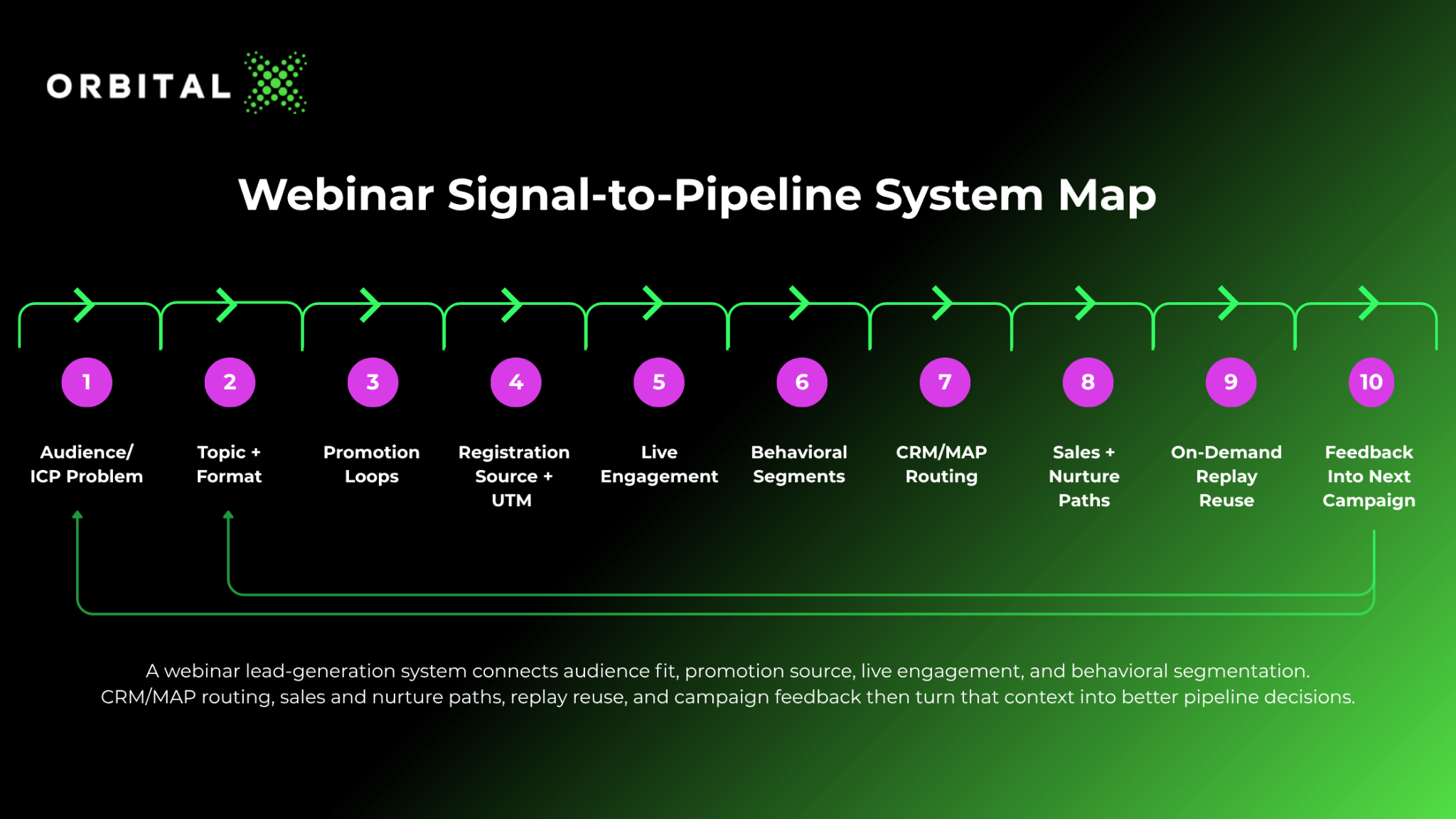
A webinar lead-generation system connects audience fit, promotion source, live engagement, and behavioral segmentation. CRM/MAP routing, sales and nurture paths, replay reuse, and campaign feedback then turn that context into better pipeline decisions.
Use the Webinar as a Sales Asset Without Turning It Into a Cold Pitch
Sales can use webinars before and after the live date, as long as they don’t go overboard. But they need to give the prospect a useful reason to reconnect instead of just dressing up a pitch in educational language.
Before the event, reps can invite accounts already discussing the problem, prospects stuck in research mode, buying-committee members who need shared context, or target accounts on an ABM list. You’re more likely to get a positive response to an invite when it’s specific about why the topic matters to that account.
After the event, follow-up should reflect participant behavior. A live attendee who asked a detailed question needs a different message from a no-show. A CTA clicker likewise deserves faster attention than someone who registered from a broad paid campaign and never engaged again.
Follow-up should also rank behavior by intent depth. Lead-scoring research points to long sales cycles being a funnel-ranking problem because conversion intent is spread across CRM records, interactions, and stages. In webinar follow-up, a CTA click, implementation question, replay return, or same-account engagement pattern should move ahead of a broad registration with no engagement.
Sales follow-up also needs the right context. “Thanks for attending,” is a weak opener. A better message references the question they asked, their poll answer, the segment they belong to, the account issue implied by their engagement, or the resource they clicked. That context turns attendance into a sales asset.
Transform the Replay Into an On-Demand Asset
Webinars shouldn’t stop working when the live session ends. A strong replay can support nurture, sales enablement, retargeting, and organic discovery.
Replay Follow-up
The first reuse path is simple. Send the replay to attendees and no-shows with different messaging. Attendees may need a summary and next step, while no-shows are better served with a more compelling reason to watch.
After that first touch, use behavior to decide the nurture path. A no-show who watches the replay can receive a short sequence around the problem covered in the session. But an attendee who clicked the CTA or asked an implementation question may need a sales task, a related case study, or a follow-up email that points to the specific issue they raised. Sales can also use short segments when a clip explains the problem better than a rep can in an email.
Content Reuse
Cut the strongest moments into short social assets. Turn the best Q&A into posts, sales snippets, newsletter material, or resource-page content. Build the replay page around a clear problem so it becomes more than a video archive.
Discovery and Feedback
On-demand webinars can support long-tail demand when they’re specific, structured, and useful. Pew Research Center found that Google users are less likely to click result links when an AI summary appears, which makes the replay page work harder once someone arrives. A thin video archive gives visitors little reason to keep reading, while a clear problem statement, useful summary, and next step can make the page more useful after the live event.
On-demand reuse also creates feedback. Replay views, clip engagement, sales usage, and nurture behavior show which topics deserve another session. Those same signals can also reveal which accounts are still active and which messages need sharpening before the next campaign.
Measure Webinar Lead Quality Beyond Event Activity
Registration and attendance are important details, but they don’t tell the whole performance story. A webinar can have a clean registration number and still produce weak pipeline movement.
Event activity vs. pipeline signal Event activity tells the team what happened during the webinar. Pipeline signal shows whether that activity changed a useful decision.
|
Useful measurement starts with audience quality. How many registrants matched the ICP? Which target accounts appeared? Which roles attended? The same registration count means different things depending on who registered.
Promotion quality comes next. Track registrations by the source that brought them in. That includes email, newsletter, website, employee posts, guest links, sales outreach, ABM lists, paid campaigns, and organic social. Guest UTMs can show which speakers brought the right audience. Paid campaigns should be judged by fit and downstream behavior, rather than cost per registrant alone.
Engagement quality shows whether the session created useful signals. Watch time, questions, poll answers, CTA clicks, resource downloads, and replay views help separate passive attendance from stronger interest. Routing quality then shows whether that signal reached the right systems. Did CRM fields update? Were nurture branches triggered? Did high-intent behaviors create sales tasks?
Registrant conversion should show movement from one state to the next. A high-fit registrant who attends, asks a question, clicks the CTA, books time, enters the right nurture path, or returns to the replay is more useful than a name on the registration list. A no-show can also convert later if the replay creates meaningful engagement. The measurement question is which registrants became more qualified, better routed, or easier for sales to approach.
Sales motion needs its own view. Track response timing, message relevance, meetings created, account progression, and sales feedback. Pipeline measurement can then ask whether webinar engagement helped the team prioritize the right conversations.
Avoid unsupported average conversion or attendance-rate claims. Determine whether the webinar led to pipeline decisions instead. If the metrics stop at registrations and attendance, the team’s only measured up to the event itself instead of the lead-generation system behind it.
Where Webinar Lead Generation Breaks for Lean B2B Teams
Webinar lead generation usually breaks between engagement and action. The team runs the event, captures interest, sends the replay, and reports the numbers. Then the signal disperses.
The failure points are predictable:
The topic attracts a mixed audience, but no one separates high-fit accounts from low-fit registrants.
Guests and employees promote the event, while source data gets ignored after registration.
Attendees answer polls and ask questions, but sales still receives a flat list.
No-shows get the same follow-up as live attendees.
Replay viewers are treated as passive content consumers.
CRM fields stay thin, nurture paths ignore behavior, and feedback never reaches the next campaign.
Instead of drowning under tedious administrative tasks, lean teams need to focus on the high-value storytelling that actually drives pipeline. DemandWEBS™ provides that lifeboat fix. OrbitalX’s marketing operating system combines AI with expert operators for lean B2B teams that need to connect data, intelligence, audiences, content, and execution in a single, powerful feedback loop.
In webinar lead generation, the demand gen system matters just as much as the event. The webinar creates data, but the team needs usable intelligence from that data. Audience decisions shape who enters the campaign, then content and promotion create the right engagement. Execution routes signals into sales and nurture while feedback improves the next campaign. That loop enables webinars to support better pipeline decisions instead of just adding more tools or headcount.
Are You Ready for Your Webinar Close-up?
To see the best results from webinar lead generation, you need to build into your revenue system. The topic attracts the right audience, promotion shows where interest came from, and registration captures the first signal. Attendance, questions, polls, CTA clicks, and replay behavior add context, then CRM, marketing automation, sales tasks, nurture paths, and reporting turn that context into action.
If the team stops at registration and attendance, the webinar becomes another activity report. Once they connect audience, signal, routing, follow-up, reuse, and feedback though, the webinar starts working as a stronger demand asset.
You aren’t trying to turn every webinar into a sales pitch. The smarter move is to design the event around a business problem, capture the behaviors that matter, and make sure those behaviors change what sales and marketing do next.
If your team is running webinars and losing signal after the event, OrbitalX can help diagnose where the system is breaking. Is the issue audience selection, promotion, or engagement capture? Is it CRM/MAP routing, sales follow-up, nurture, on-demand reuse, or the feedback loop after the campaign? DemandWEBS™ gives lean B2B teams a way to turn fragmented webinar activity into better pipeline decisions without treating another tool as the answer.
Book a call with OrbitalX to see how DemandWEBS™ can help your team turn webinar engagement into coordinated pipeline action.
FAQ
What is webinar lead generation?
Webinar lead generation is the use of live or on-demand online events to attract potential buyers, collect registration and engagement data, and guide follow-up. In B2B, the useful output goes beyond a contact record because the team can read signals from who registered, see how they engaged and what they asked, and learn what action they took after the event.
Are webinars good for B2B lead generation?
Yes. Webinars can support B2B lead generation by attracting target accounts, creating first-party engagement signals, giving sales a reason to follow up, and producing an on-demand asset after the live session. They need the right foundation to work well. That base includes a clear ICP, a topic tied to a real buyer problem, clean routing into CRM and nurture, and sales follow-up shaped by what each person actually did.
How do you promote a lead generation webinar?
Use a mix of owned email, newsletters, website placement, organic social, employee advocacy, guest or speaker promotion, sales outreach, ABM lists, and paid campaigns when targeting supports the goal. Successful promotion connects each channel to the type of registrant, account, or signal it’s meant to create.
What should sales do with webinar leads?
Sales should use webinar behavior as context for outreach. A rep can invite active prospects before the session, then follow up based on attendance, questions, poll responses, CTA clicks, account fit, and replay behavior. The message should reflect what the person actually did during the event, with the registration list serving only as the starting point.
How do you follow up with webinar no-shows?
No-shows still showed enough interest to register, so they shouldn’t be discarded. Send a recording of the session or a replay link with a compelling reason to watch, then follow with a value-focused summary, and route high-fit accounts into a nurture or sales path based on account relevance and any later replay engagement.
What metrics should you track for webinar lead generation?
Track audience fit, registration source, attendance, watch duration, questions, poll responses, CTA clicks, and replay views. Then connect those engagement signals to CRM/MAP routing, sales tasks, response timing, meetings created, nurture movement, and pipeline influence. Registration and attendance are useful, but they don’t show whether the webinar helped pipeline decisions.
Should webinars be live, on-demand, or both?
Many B2B teams can use both when the topic’s value can extend beyond the live date. Live webinars create urgency, interaction, Q&A, and richer engagement signals. On-demand webinars extend the asset through replay pages, nurture sequences, sales enablement, retargeting, and content reuse.
More Resources
B2B Market Research: Methods, Process, and How to Use It
Learn what B2B market research is, explore key methods and types, and discover how to turn research findings into better business decisions.
How to Choose A B2B Marketing Agency That Drives Pipeline
Learn what a B2B marketing agency does, when to hire one, what services it provides, what it costs, and how to choose the right agency for your business.
B2B Product Marketing: Strategy and Execution
Learn how B2B product marketing connects positioning, GTM, sales enablement, and customer outcomes to drive commercial growth.